Guide
A work log the client will actually read
The client does not read a work log. They read three sentences, on a page they already had open, and they remember one of them at renewal. The log is still worth keeping, if those sentences are the log. A dump of plugin versions, ticket numbers, and “misc” is a diary. A diary is for you. This page is how I write the lines that survive contact with a person who did not watch me work.
In the product the section is called “Work this period.” It appears on the client digest only when at least one entry falls in that window. It does not appear on the public status page. The status page is current uptime and probe incidents. If you wanted the work on the Sunday link, you wanted the digest. That split is drawn on the status page comparison. The blank letter around the log is the maintenance report template.
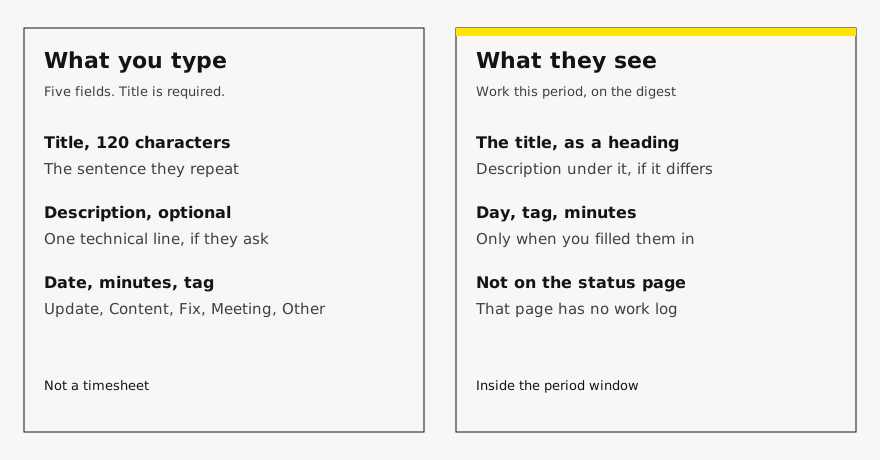
The five fields, and what each one is for
The form asks for a title, a date, minutes, a tag, and a description. The title is the only required field. It has to be short: 120 characters is the limit, and you should stop well before that. The description can be empty, up to 2000 characters. If the description is the same text as the title, the digest hides it, so you do not get the sentence twice. Use the description for the technical line they might ask about, or leave it blank.
The date is the day the work belongs to, as YYYY-MM-DD, or blank. A blank date uses the day you saved the entry. I fill the date when the client felt the change on a different day than the day I typed it. I do not backdate a line into last month’s window to make a thin letter look busy. Minutes are optional, a whole number from 1 to 10080, which is long enough to be a mistake and short enough to stop a novel. I put minutes when the number helps them see the size, and I leave them off when the number would turn the page into a timesheet. The screen itself says there are no tickets, timers, or invoices in this log. Believe it. If you need a timesheet, keep a timesheet. Do not make the client read one.
The tag is one of five: Update, Content, Fix, Meeting, or Other. Anything else becomes Other. The tag is a label under the title, not a filing system you will report on. I use Update for a platform change they might have felt, Content for words or images they asked for, Fix for something that was broken, Meeting for a call that changed a decision, and Other when forcing a tag would be a lie. I do not create a personal taxonomy in the title (“[WP][P2]”) because the tag already exists and the client does not want your codes.
A line they can repeat, and the line I stopped sending
The bad title names your labor. The better title names their outcome. I keep a technical note underneath when the outcome would otherwise sound like magic.
Weak title: Updated plugins
Better title: Contact form delivers again
Description: Updated the form plugin after it stopped sending. Checked the wholesale inbox.
Tag: Fix
Date: the day they could send again
Minutes: 30, or blank if 30 would start an argument
Another pair, because content work is where people paste the CMS:
Weak title: Homepage edits
Better title: Spring hours are on the homepage
Description: Swapped the three lines Nora sent on Tuesday. No new page.
Tag: Content
“And I updated plugins” can be a description under a real outcome, or a single Update line if the care plan promised updates and nothing else happened that they would notice. A list of fourteen version numbers is the dashboard. The dashboard can stay open on your side. The MainWP page is the version of that argument for people who already have a plugin report. The log will not reconstruct the child plugin’s activity. You type the sentence, or a script posts a sentence to the API. Nothing on their server is filling this in for you.
A month of lines, copied from a fictional shop
Harbor & Co is not a customer. The entries are the shape I want on a Care plan, not a record of hours I billed. Four lines is a busy month. Some months are one line. Some months are none.
3 March — Fix — 40 min
Title: Wholesale form sends to the right inbox
Description: The notification address was an old staff alias. Pointed it at [email protected] and sent a test.

9 March — Content — 20 min
Title: Trade price list matches the PDF Nora sent
Description: Three numbers on the existing trade page. Not a new page.

18 March — Update — 25 min
Title: Checkout still completes after the Tuesday updates
Description: Plugin and theme updates, then a test order on the public wholesale path.

24 March — Meeting — 30 min
Title: Agreed the careers page is a quote, not a small change
Description: Nora asked for a new page. It stays out of the four included changes.
Read those titles without the tags. You can still tell what happened. That is the test. If a title only makes sense next to its tag, the title is doing the tag’s job badly and the tag is doing the title’s job, which the client will not forgive. The meeting line is the one agencies skip, and it is the one that saves the renewal conversation, because the scope decision is written down in their words. The agreement those four changes sit inside is the care plan agreement. The log is not a second contract. It is evidence the contract was followed, including the no.
What the digest keeps, and what it drops
The digest does not print your entire history. It prints entries whose day falls in the period. If there is a previous report, the window runs from that report to this one. If there is not, the window follows the cadence: about a day for a daily or twice-daily check, about a week for weekly, about 28 days for monthly. An entry dated before the window stays in your log and stays off this letter. An entry you add tomorrow waits for the next letter. I write the date as the day the client would place the work, and I add the entry before I send the letter, not the week after when I remember.
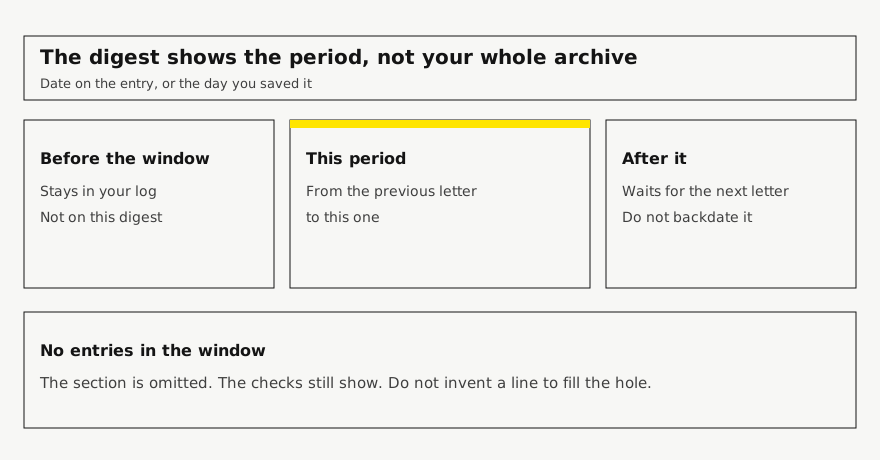
If the window has no entries, the section is omitted. The checks still show: uptime, certificate, domain, whatever the digest had. That is a legitimate quiet month, and the note you send around it is on quiet-month emails. Do not invent “general maintenance, 15 min” so the section exists. I have done that, and the client asked what general meant, and I did not have an answer that was better than the silence I had tried to avoid. Silence, next to a page that loaded, is an answer. A vague line is a question.
Why the lines matter when the fee comes up again is on making the work visible. The annual reading of those lines, twelve of them in a pile, is the annual review. You will be grateful, in that meeting, for titles that still make sense in March of the following year. You will not be grateful for “misc” and “as discussed.”
What I refuse to put in the log
Passwords, API keys, and the contents of a form submission. The digest is a link they can forward. Treat every description as something their bookkeeper might read. Internal irritation. “Nora changed her mind again” is not a work entry. The decision is. “Spring hours moved back to the April dates” is a work entry. The sigh is for a notebook they will never see.
A security finding I have not confirmed. The product is not a vulnerability scan, and a scary title on a care log is how a normal Tuesday becomes an incident you cannot finish. If something is actually wrong, the incident note is a different piece of writing, sent while it is wrong, not a tag called Fix three weeks later with the word breach in it. Other people’s hours. If a contractor did the work, the title can say what the client got, and the description can name who did it if the client should know. It should not be a subcontract you were hoping they would not notice, buried under your name.
A duplicate of the uptime percentage. The digest already has uptime. “Site was up” as the only line of the month is the vague line again. If the month’s only news is that it was up, leave the work section empty and let the check say so. The log is for work. The probe is for reachability. Mixing them makes both look like filler.
A writing pass that takes ten minutes
I do this on the morning I send the letter, not as a separate ritual with a template folder.
For each site I am about to send:
- Read the entries already in this period.
- Delete any title I would not say out loud to them.
- If two entries are the same outcome, keep one and put the detail in the description.
- If a title is a tool name, rewrite it as the thing they can see.
- If the description repeats the title, clear the description.
- If I did something they felt and it is not here, add it now, with today’s date or the real date.
- If I did nothing they felt, add nothing.
- Open the digest. Read only the work section. Stop when a line needs me to explain it in chat.
The last step is the whole method. A line that needs a chat is a line that failed. Fix it before you send the link. The chat can still happen. It should not be required to understand the month.
WordPress, Webflow, a Next.js site: the fields do not change. The examples change. On a site you cannot edit, Content and Update may be rare, and Fix may be “I told the host, and they renewed the certificate.” That is still a sentence. Do not skip the log because the stack has no plugin screen. The point of the log is that it was never the plugin screen. The page for mixed stacks is reporting beyond WordPress. The care-plan wording, when the site is WordPress and you want that tone, is care-plan reporting.
Who the log is not for
It is not for your future self’s forensic reconstruction. Keep commits, the host’s panel, and the update tool for that. It is not for an accountant who wants every minute. Minutes are a hint, capped, optional, and easy to omit. It is not for the status-page subscriber who only asked whether the site was down. They get the status page, without this section, on purpose.
It is for the person who pays the retainer and will not attend your stand-up. They get a short list, in their vocabulary, dated inside the month they are looking at. If you can read your own last entry and know which client it was without the site name above it, you wrote it for them. If you need the site name to decode it, you wrote it for the folder. Rewrite it. The folder does not renew.
Plans are Starter at $9/month for up to 5 sites, Studio at $29/month for up to 25 sites, and Agency at $79/month for up to 100 sites. Starter, including a trial, keeps a small Powered by RetainerProof link on the client digest and the public status page. Studio and Agency remove that link. Prices are on the pricing page.
Related guides
- Reporting for agencies
- Beyond WordPress
- Maintenance report template
- ManageWP alternative
- Uptime report
- Prove retainer value
- Care-plan reporting
- Client status pages
- MainWP alternative
- Quiet-month emails
- Reporting tools
- ManageWP alternatives
- Contract template
- Annual review
- Status page comparison
Also see pricing and a sample client digest.
Monthly agency tip
One tip a month.
One practical tip a month on proving your retainer is worth it. No spam.
I email a confirmation link before I add you. I store the address, this page, and the date. Unsubscribe any time. Read the privacy page.