Guide
WordPress client reporting tools, compared without a winner’s badge
These tools do not do the same job. Five of them are WordPress maintenance suites that can also emit a report. One of them is the report, and it will not update a plugin for you. I am that last one. I am not going to pretend the comparison is a ranking.
I read the public pages on 13 October 2026. Prices below are the ones printed that day. Where a page did not show a price, I say so. I do not fill the hole. Where two layouts on the same URL disagreed, I quote both and I do not pick a favorite. Nothing here is a customer quote, a rating, or a count of their users that I verified.
If you already know you want the client page and not the suite, the shorter pages are ManageWP client reports and the MainWP alternative for client reporting. This page is the wider table. The 2026 list that adds WP Remote, and the question of whether anyone reads the PDF, is ManageWP alternatives for agencies. What that report should contain is the WordPress maintenance report.
The only question I use
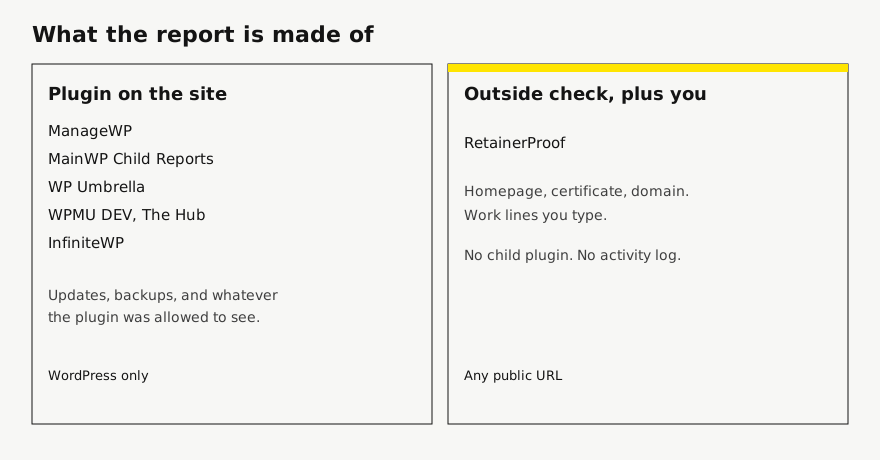
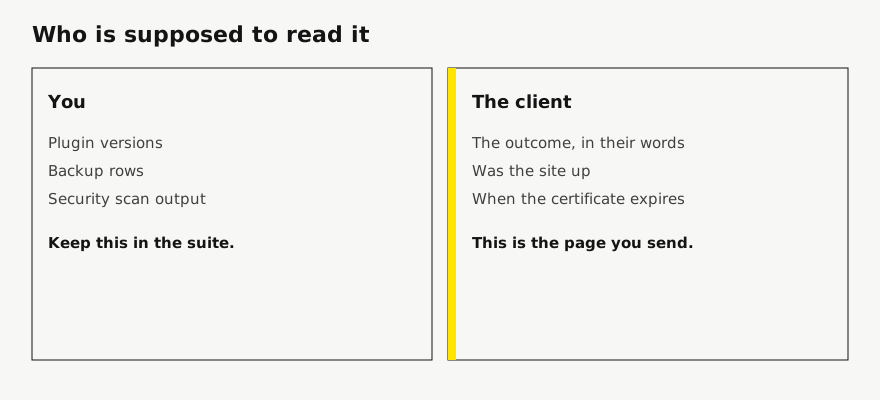
Who is the report for, and what is it allowed to know? A plugin on the site can know that you updated WooCommerce. An outside check can know that the homepage answered and when the certificate expires. Neither of those facts is the sentence “restored reliable email delivery.” That sentence is you, unless you train yourself to write it into whatever tool you already pay for.
So the useful comparison is not “which dashboard has reports.” It is: does the client have to understand a WordPress activity log, and do you mind installing something to produce it?
ManageWP
ManageWP’s client-report page splits the feature in two. The free report was $0 per month. It includes a logo, a custom work section, a PDF, localization in 25 or more languages, a ManageWP watermark, and mail sent from a ManageWP address. Premium was $1 per site per month, or $25 a month for up to 100 sites. Premium removes the watermark, sends from your own address, schedules weekly, bi-weekly, or monthly, and can bulk-send. The pricing page listed Advanced Client Reports as $1 and $25 in that same per-site and bundle pattern, and an all-in-one package at $150. Add-ons are billed after you use them. They say there is no long-term contract. The free tier also lists Client Reports, which matches the $0 card.
That is a real client-report product, inside a WordPress suite. The custom work section is the part I would actually use, because it is the only place the outcome can live. The rest of the report is whatever ManageWP add-ons you turned on: updates, backups, analytics, WooCommerce. If the client’s site is not WordPress, none of this attaches. I wrote the “keep the suite, change the letter” version on the ManageWP page.
MainWP
MainWP’s pricing page showed Essentials as free, and Pro at $29 billed monthly, $199 billed yearly, and $599 lifetime. Monthly and yearly were both on the page because of the toggle, so I am quoting the cards, not a blended price. A FAQ repeated the $599 lifetime price and a 30-day money-back guarantee. Pro Reports, on its own page, needs the Child Reports plugin on every child site, and that plugin needs PHP 7.4 or higher. You can brand it, email a PDF from the dashboard, and include uptime if the Advanced Uptime Monitor extension is also installed. I did not find a price that was only for reports. The extension page points at MainWP Pro.
The pricing matrix also mentions automatically generating reports next to both the free and Pro columns, in a layout I could not trust as “Essentials includes Pro Reports.” I am not saying the free plan sends that extension’s report. If it sends something thinner, I could not separate it from the Pro extension on those two pages. That item stays unverified. The working split is on the MainWP page.
WP Umbrella
WP Umbrella’s pricing card printed both 1.99€ and $2.19 per site per month. I am not converting one into the other. White-label client reporting is in that base price, not an add-on. The optional extras on the same page were a security add-on at 2€ or $2 per site per month, and hourly backups at 2.49€ or $2.49 per site per month. The trial is 14 days, no card, and they say they will not auto-charge a card they do not have. You can cancel at any moment. A yearly prepay is described as an automatic 10% discount, drawn down monthly.
The reports page says the product gathers updates, backups, monitoring, and security without you typing them, and that you can still add manual work. It offers 50 or more variables, a white-label report with your name, logo, and colors, sending from your own domain, and delivery as email or PDF on a schedule. Updates made in wp-admin are described as added automatically. That is a stronger “the report writes itself” claim than I make, and it is also why the report is a WordPress report. A Next.js site has no wp-admin for them to watch.
The same pricing page prints “80,000+ sites (as of October 2026)” and “5,000+ agencies.” Those are their claims. I did not count their customers, and I am not borrowing the numbers.
WPMU DEV
The WPMU DEV reports page says the reports are 100% white label, that there is no extra cost, and that you can create them for unlimited websites and clients. It lists more than 40 languages, a schedule, and sections for performance and SEO, security, updates and backups, analytics and uptime, broken links, and client billing. It does not name a minimum membership. I will not invent one. “No extra cost” means no extra line for reports. It does not mean the membership is free. Which of the plans below is the smallest one that unlocks reports was not on the reports page, so that detail is unverified.
The pricing page the same day showed Pro Basic at $50 a year for 1 site, Pro Standard at $75 a year for 3 sites, and Pro Plus at $100 a year for 10 sites. The Premium card showed $9.99 a month struck through and $4.99 for the first 3 months. I did not see a separate figure for month four written out next to that offer. The struck $9.99 is the comparison price the page printed, not a price I calculated. There is a 30-day money-back line on that page. Reports can include client billing, which is a different product from a care letter. I would not send an invoice list as the maintenance report unless the client asked for billing in the same PDF.
InfiniteWP
InfiniteWP’s client-reporting addon page describes weekly or monthly reports, a PDF or an email from the dashboard, control over what appears, notes in the header and footer, and a logo. The price on that page did not come through as a number. I could see “/ year” and not the figure in front of it. I am not guessing the addon price. Treat it as unverified until you are on the page and can see the digits yourself.
The pricing page was two grids on one URL. The FAQ’s own upgrade example uses Starter at $147 for 10 sites and Developer at $247 for 20 sites, and it spells the difference as $100. The same FAQ sets Freelancer at 50 sites, Agency at unlimited, and Enterprise at an infinite number of sites, with support as the other difference. A second grid on that URL showed other prices, including an Agency card at $397 and $497 a year for 100 sites. I am not going to decide which Agency number is the one in the cart. Client Reporting sits in the paid feature list. The free panel, as listed, is 1-click admin access, 1-click updates, and backup and restore. They also print a refund within 14 days of purchase. The report is still a WordPress event log: backups, updates, uptime, analytics, malware scans, comments. Useful to you. Easy to forward by mistake.
RetainerProof
I do not update plugins, I do not take backups, and I do not install a plugin. If the URL is public, I can check it, including a site that is not WordPress. Homepage probes run every 15 minutes by default, down to 30 seconds per site. A fuller check on the cadence you pick records the certificate, the domain date, and a Lighthouse snapshot. You write the work. If you write nothing in the period, the work section is omitted. The client opens one secret link. They do not get an account. You can mail up to five addresses after a scheduled check. A check you run by hand does not send that mail. A PDF is the same page, not a second report.
Your name and accent are on the page at every plan. Starter keeps a small Powered by RetainerProof link, including on a trial. Studio and Agency remove it on the report and on the public status page. There is no per-site reporting fee. I am not a dedicated monitor, and I will not reconstruct a plugin changelog. If that changelog is the report you want, buy one of the suites above and skip me.
The prices are in the last paragraph of this page, the same ones as on the pricing section. I am not going to restate them as if they were a competitor’s.
A table I am willing to stand behind
Blank cells would have been guesses. “Unverified” means I looked and the page did not settle it.
| Tool | Report is fed by | Price I will quote |
|---|---|---|
| ManageWP | Its own add-ons, plus a custom work section. WordPress. | Free report $0. Premium $1 per site per month, or $25 a month up to 100 sites. |
| MainWP | Child Reports plugin, PHP 7.4 or newer. Uptime only with the uptime extension. | Pro $29 a month, $199 a year, or $599 lifetime. No separate report price. Whether Essentials sends a report: unverified. |
| WP Umbrella | Its WordPress maintenance data, plus manual lines. White-label in the base price. | 1.99€ and $2.19 per site per month, both printed. Security and hourly backups are extra. |
| WPMU DEV | Hub services: updates, security, backups, uptime, billing, and others. WordPress. | Reports: no extra line, minimum plan unverified. Memberships on the pricing page started at $50 a year for 1 site. |
| InfiniteWP | Recorded WordPress events. PDF or email. | Addon price unverified. FAQ example: Starter $147 for 10 sites. A second grid disagreed on other tiers. |
| RetainerProof | Outside checks, plus lines you write. Any public URL. | The three monthly plans in the pricing section. No per-site report add-on. |
How I would choose, without a badge
If every property is WordPress and the client is happy with an operations PDF, use the suite you already run. Switching suites to get a slightly different plugin table is a migration, not a reporting strategy. ManageWP’s $1 report is the cheapest way I saw to take a vendor watermark off a WordPress report. WP Umbrella is the one that puts white-label reporting inside a single per-site price and says the log fills itself. MainWP is the one you self-host, with reports as part of Pro rather than a dollar-per-site add-on. WPMU DEV is a membership and a plugin suite that also sends reports, and I would read the cart before believing “unlimited.” InfiniteWP is the same family, and I would not buy the reporting addon until the price is visible on the page in front of me.
Use a separate client page when the reader is not you. That is the usual agency problem, and it gets worse the moment one site is not WordPress. The page for that mix is reporting beyond WordPress. The sentence to put at the top, once you have picked a tool, is on care-plan reporting.
I would not cancel a suite because you started sending a client link. The suite updates the site. The link explains the month. Those are still two jobs. The uptime half of the link is not a reason to drop a one-minute monitor either. That limit is spelled out on the client website uptime report.
What I left out on purpose
Star ratings, “trusted by” counts, and G2 badges. They were on some of these pages. They are not a measurement I made. Speed of support, which several of them advertise, I have not timed. A feature I could not find on the public page is absent from this article, not scored as a no.
I also left out white-label as a single yes or no. ManageWP’s free report keeps their watermark and their sending address. Premium removes the watermark. MainWP Pro can rename the child plugin. WP Umbrella says the report can be their white-label, including your sending domain. WPMU DEV says 100% white label on the reports page. InfiniteWP lets you add a logo. On my side, the studio name leads every plan, and the product link comes off on Studio and Agency, on the report and on the status page. Those are not the same switch. Calling all of them white-label and ticking a column would be sloppy. The status-page version of the same care is on white-label status pages.
Start a client website report if the missing piece is the page the client opens. If the missing piece is bulk updates, pick a suite from the table and ignore the signup.
Plans are Starter at $9/month for up to 5 sites, Studio at $29/month for up to 25 sites, and Agency at $79/month for up to 100 sites. Starter, including a trial, keeps a small Powered by RetainerProof link on the client digest and the public status page. Studio and Agency remove that link. Prices are on the pricing page.
Related guides
- Reporting for agencies
- Beyond WordPress
- Maintenance report template
- ManageWP alternative
- Uptime report
- Prove retainer value
- Care-plan reporting
- Client status pages
- MainWP alternative
- Quiet-month emails
- ManageWP alternatives
- Contract template
- Annual review
- Status page comparison
- Client work log
Also see pricing and a sample client digest.
Monthly agency tip
One tip a month.
One practical tip a month on proving your retainer is worth it. No spam.
I email a confirmation link before I add you. I store the address, this page, and the date. Unsubscribe any time. Read the privacy page.