Guide
Make website maintenance work visible to the client
A care retainer feels expensive when the only evidence is that nothing broke. The work is real. It is invisible until you put it where the client already looks.
I do not mean a quarterly slide. I mean the same page, every period, with the work written as an outcome and the checks sitting next to it so the outcome is not a slogan.
Write the line they can repeat
“Updated DNS” tells a future you what you clicked. “Restored reliable email delivery” tells the client why the month mattered. Put the technical event in a second line if you need it. The first line is what gets remembered at renewal, which is the only meeting that counts.
A weak month and a usable one
Weak: “Updated plugins. Checked forms. General maintenance. Uptime 100%.” The client learns that you were busy and that nothing broke. They still cannot point at a result.
Usable: “Restored reliable email delivery. The contact form had been landing in spam since the new sender went live. I updated the SPF record. Homepage was up all month. Certificate expires in June.” Same hour of work, different conversation. The second one is what I want in the room when someone asks if the retainer is worth it.
A few honest lines beat a dump of everything you touched. If the month was quiet, say it was quiet and show the uptime. Do not invent chores. A client can smell a padded log, and then they stop trusting the real months.
The blank structure is the website maintenance report template. Use it even if you still send the report as an email.
Put the work where the checks are
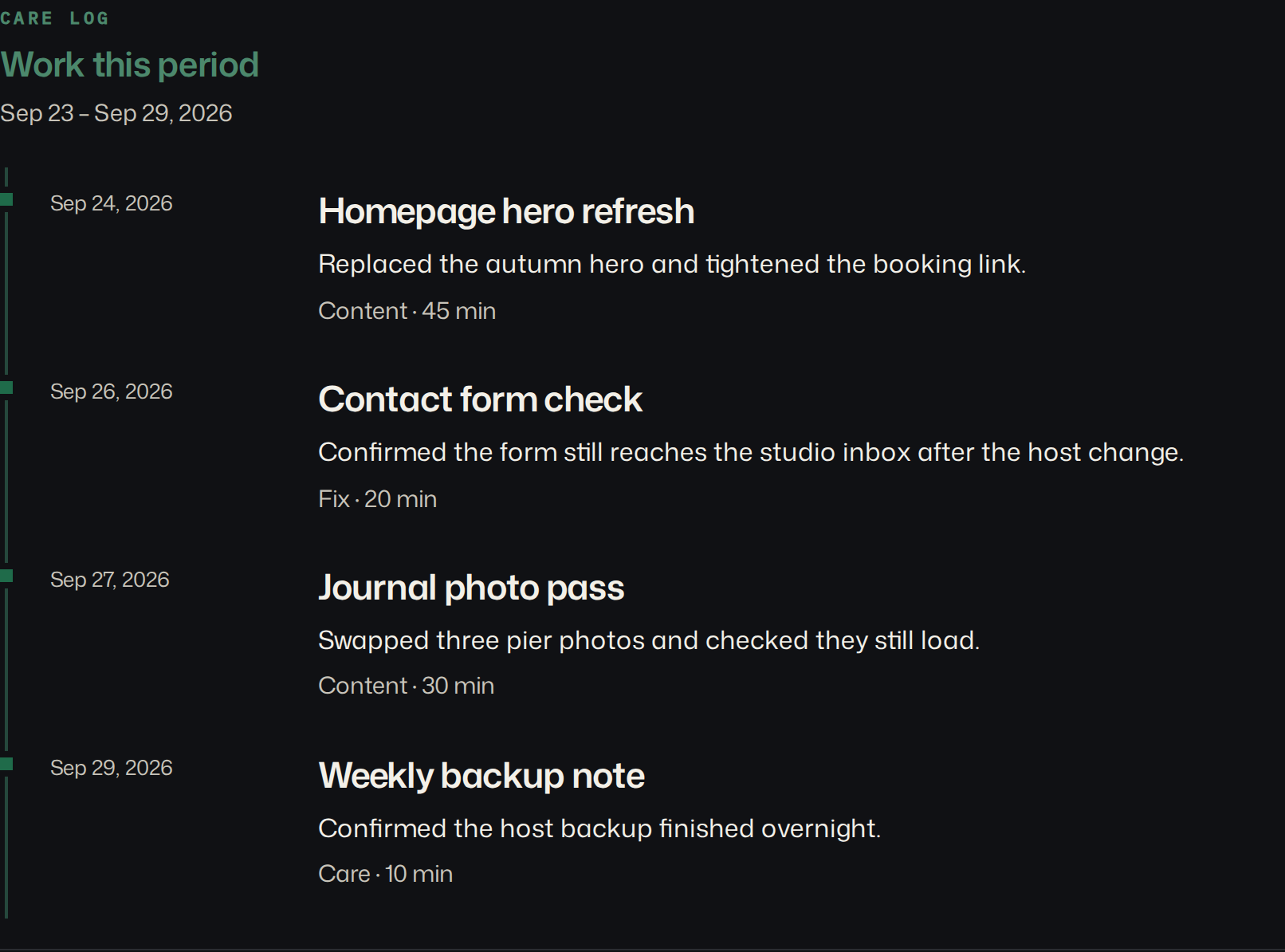
On the client report, work entries for the period show under “Work this period,” next to uptime, certificate dates, and Lighthouse scores. Each entry is a date, a title, and optional notes and minutes. The title should be the outcome. The notes can hold the technical event.
You still do the maintenance in whatever tool fits the stack. The log is not an automatic plugin list, and it is not a security audit. Nothing on the server is reporting back. If you want the lines appended from a script instead of the form, the write API does that. The client still sees the same page.
I do not generate a year-in-review. There is no annual recap button. At renewal I open the last few reports on the same URL and read the work lines out loud. That is the history. If I have not written the lines, the renewal is a feeling again.
When the client wants to cut the retainer in half
The guides that rank for this search are about reports, health scores, and the renewal pitch. The conversation that actually tests the retainer is smaller and blunter: someone new on the client side reads the invoices and asks to pay half.
That is the case in a 2019 r/freelance thread. The poster was a copywriter, not a web developer, but the shape is the same. A new head of marketing pointed out that only three of the last six months had used the full 80 hours, and proposed halving them. quiet_repub suggested answering with the average hours used per month over the last twelve months, and a new rate for that number. darkspot_ added that half the hours does not have to mean half the price, because the old rate carried a volume discount.
You can only give that answer if the hours are written down. In a 2025 r/Wordpress thread, SlimPuffs, at an agency with over 250 sites, said that when a client asks what they are paying for, they bring the proposal out again. The proposal says what you promised. It does not say what you did.
So before that meeting, open the reports for the last twelve months and add up the minutes on the work lines. The page shows minutes per line. It does not total them for you. Then say the number out loud, even if it is low. If they used half, offer the smaller tier from your proposal at its own price, and keep the response time that goes with it. Defending hours they can see were not used costs you more than the cut.
What not to lead with
The uptime percentage is supporting evidence. It is not the retainer. A public status page is even thinner: current state, no work at all. Useful when someone wants to look on a Sunday. Useless as proof you did anything. That page is described under white-label status pages.
Do not lead the month with a monitoring brand, a terminal, or a response code. The buyer is the person who pays for care. They want to see the care. The checks are how you show you are not making the care up.
For a whole roster, the commercial page is website maintenance reporting for agencies. Same idea, including the stacks that are not WordPress.
Make it look like your studio
Your name and accent are on the report. Optional phone, website, and contact email sit in the letterhead. Starter keeps a small Powered by RetainerProof link, including during a trial. Studio and Agency remove it on the report and on the public status page. The client uses the link you send. They do not need an account. In the product the link is a digest. With the client, call it the report.
Start a client website report and write two outcome lines before you show it to anyone. If the lines are weak, the page will not save the retainer.
Plans are Starter at $9/month for up to 5 sites, Studio at $29/month for up to 25 sites, and Agency at $79/month for up to 100 sites. Starter, including a trial, keeps a small Powered by RetainerProof link on the client digest and the public status page. Studio and Agency remove that link. Prices are on the pricing page.
Related guides
- Reporting for agencies
- Beyond WordPress
- Maintenance report template
- ManageWP alternative
- Uptime report
- Care-plan reporting
- Client status pages
- MainWP alternative
- Quiet-month emails
- Reporting tools
- ManageWP alternatives
- Contract template
- Annual review
- Status page comparison
- Client work log
Also see pricing and a sample client digest.
Monthly agency tip
One tip a month.
One practical tip a month on proving your retainer is worth it. No spam.
I email a confirmation link before I add you. I store the address, this page, and the date. Unsubscribe any time. Read the privacy page.