Guide
Website maintenance emails for the month nothing broke
The month that gets a retainer cancelled is rarely the month something broke. It is the month you had nothing to say, so you said nothing, or you invented chores.
I have done both. Silence reads as absence. A padded log reads as a lie, and then the busy months stop counting too. A quiet month needs a short email that admits the quiet and still shows the site was watched.
The shape of the page itself is the website maintenance report template. This page is the note you put around that page when the work section would otherwise be empty. Why those lines matter at renewal is on making the work visible.
What “quiet” is allowed to mean
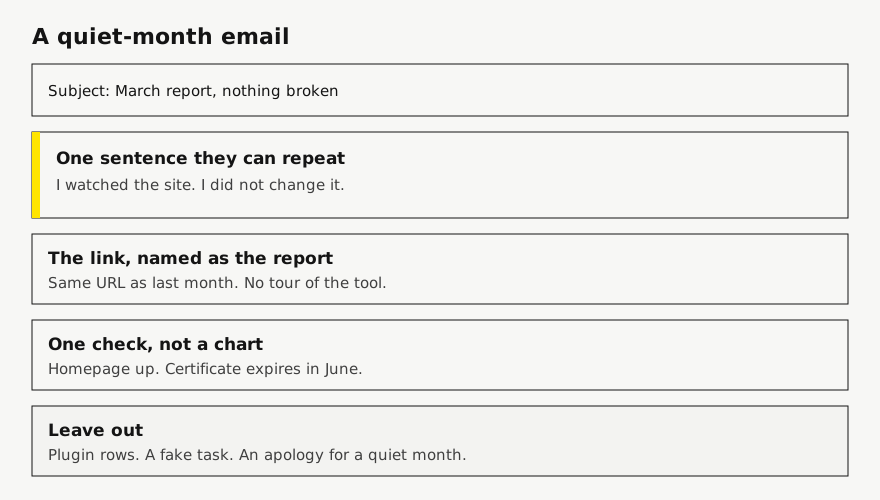
Quiet means you opened the site, the thing they pay you to protect still works, and you did not change it. It does not mean you forgot them. It does not mean you are embarrassed. A care retainer includes the judgment not to touch a stable site.
Write that judgment in one sentence they could repeat to a colleague. “I watched the site. I did not change it.” “The contact form still sends. I left the theme alone.” “Homepage was up. Certificate expires in June. No edits.” If you cannot say it that plainly, you are about to decorate.
Do not apologize for the quiet. “Sorry there isn’t much this month” teaches them that a care month is supposed to be a pile of tasks. Then a real quiet month looks like you under-delivered. The month delivered watching. Say so.
What the page does if you log nothing
On the client report, work entries for the period show under “Work this period.” Each one is a date, a title, an optional note, a tag, and optional minutes. If the title is empty, it is hidden. If there are no entries in the period, that whole section is omitted. The page is then the checks: uptime, certificate, domain, a Lighthouse snapshot when one exists. That is an honest page. It is also easy to misread as “they didn’t do anything,” which is why the email has to say the sentence the page no longer has a work heading for.
You have two honest choices. Leave the work section empty and put the sentence in the email. Or log one line whose title is the sentence, so the page says it too when they open the link in July and do not have your email. I prefer the second once the retainer is a few months old. The email gets deleted. The link does not.
A line I will log on a genuinely quiet month:
Title: Watched the site. No change worth making.
Note: Homepage, contact form, and checkout all did the thing they did last month.
Tag: Other
Minutes: leave blank
I leave minutes blank unless the client’s contract asks for time. A number with nothing under it looks like a timesheet. The tag “Other” is the least theatrical of the tags the form offers. “Update” would be a lie if you did not update anything.
Copy this, for a month with no change
Square brackets are blanks. Send it from you, not from a tool’s brand. The link is the report. Do not attach a second story.
To: [client]
Subject: [Month] report for [site name]

[First name],

I watched [site] through [month]. I did not change it. The homepage was up, and the certificate expires [date].

The report is the same link as last month:
[https://…]

If you want something changed, reply with that and I will treat it as work outside the care plan, or inside it, depending on what we agreed.

[Your name]
The last paragraph is optional, and only if your scope actually distinguishes care from new work. If everything they ask for is inside the plan, delete it. Do not invent a boundary in an email that the agreement does not have. The agreement itself is a different document, the website maintenance contract template. This is the monthly note.
Copy this, when there was one real thing
One real thing is not a quiet month, and it is not a chance to list twelve other glances. Name the thing. Stop.
To: [client]
Subject: [Month] report for [site name]

[First name],

One change this month: the contact form sends again. It had been failing on a phone since the new footer. I fixed that on [date].

Nothing else needed a change. Homepage was up except [date, duration], which the host called a network blip. Certificate expires [date].

Same report link:
[https://…]

[Your name]
If you also updated plugins, do not add them as a second headline unless an update is the thing the client felt. “And I updated plugins” at the bottom is fine as a single clause if your care plan promises updates. A list of version numbers is the dashboard talking. The WordPress version of the outcome line is on care-plan reporting.
Copy this, when they reply “so what am I paying for?”
This one is the reply, not the monthly note. Do not get defensive. Do not send a year of plugin logs. Point at the quiet months as the point.
Subject: Re: the care plan

The plan is that I watch [site], I change it when it needs a change, and I tell you either way.

[Month] did not need a change. The report for that month shows the homepage checks and the certificate date, and it says I left the site alone. [Earlier month] is the one where [outcome they remember, such as email delivery].

Same link, both months:
[https://…]

If you would rather the plan only covered changes, we can rewrite it that way. Watching would stop being included, and a quiet month would not have a report.
The last paragraph is a real offer, so only send it if you would actually rewrite the scope. I have used it once. The client did not want watching to stop. They wanted to hear that watching was the work. The email before that had been silence, which is why they asked.
Copy this, when a date is the only news
Certificate and domain dates are the part of a quiet month that is still a fact with a deadline. Lead with the date if it is inside the window you promised to act on. Do not lead with it if it expires next year. That is padding with a true sentence.
Subject: Certificate on [site] renews [date]

[First name],

No content changes this month. The certificate on [site] expires [date], [days] days from now. I renew it before the 21-day mark, which is [date]. You do not need to do anything.

The rest of the month is on the usual link:
[https://…]

[Your name]
I mention 21 days because that is when I start treating a certificate as needing a look, not because a client asked for the number. If your own rule is 30 days, write 30. Do not copy my threshold into their email and then miss it.
Domain dates work the same way, with a longer runway. “Domain expires in 400 days” is not news. “Domain expires in 40 days and the registrar login is still in your name” is news, and it is a question about access, not a maintenance boast.
Subjects that do not beg
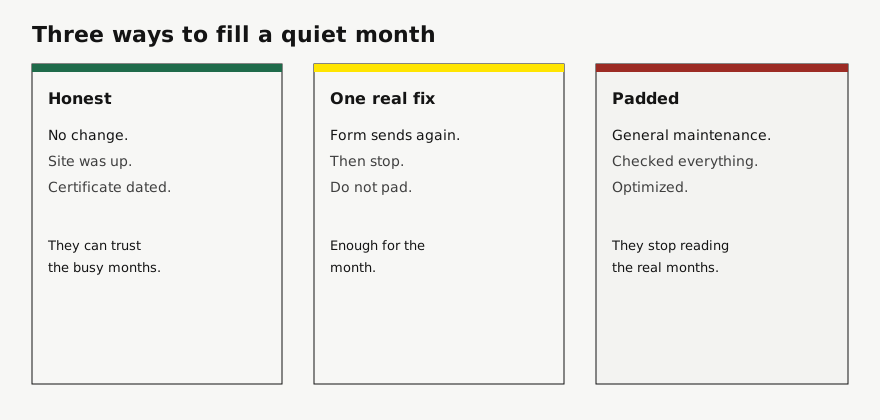
I use the month and the site. “March report for Harbor.” “April report for Harbor, form fixed.” I do not use “Your monthly website health digest,” “We have been busy keeping you safe,” or a string of emojis. The subject is a filing label. They should be able to search their mail for the site name and find the year.
If the month had a real incident, the subject says that, not “report.” “Harbor was down for 20 minutes on 3 March” is a better subject than a cheerful monthly wrapper with the outage in paragraph four. The uptime section of the page is described on the client website uptime report. The email should not be softer than the page.
What I stopped sending
“General maintenance performed.” There is no picture in that sentence. Delete it.
A plugin table in the body of the email. If they want it, it lives in the tool that produced it. The email is four or five sentences.
Two attachments plus a link. One destination. If they still file paper, the report page has a PDF of the same page. I mention the PDF when someone has asked for a file. I do not lead with it.
A recap of my process. “First I checked uptime, then I reviewed plugins, then I…” They hired the result. The sequence is for me.
A green badge, a malware claim, or a backup percentage I did not open. Quiet months are where those sentences breed, because you are looking for something that sounds like work. They are also where a client who knows their site was fine starts to distrust you.
Who gets the mail, and when it actually goes out
I send the note myself when the month was quiet enough that the sentence matters. The product can also mail the report. You can store up to five client addresses. After a scheduled check, if you turned that mail on, they get a short message with the link. The schedule for that mail is each scheduled check, weekly, or monthly. It is separate from how often the fuller check runs.
A check you start by hand does not send that mail. I use the manual check when I want to see the page before anyone else does. I do not use it as the send button. Alerts when a probe goes red come to me, not to those five addresses. The client mail is the report. The alert is the pager.
If you rely on the automatic mail, the quiet-month sentence still has to be on the page, because the automatic mail is a pointer, not a letter. Log the honest line before the scheduled check runs, or the email will point at a page with no work section. That is survivable for one month. It is a bad habit.
A quarter of quiet, which happens
Some sites are quiet for three months. A brochure. A campaign that ended. I do not escalate the adjectives. March says I watched it. April says I watched it, and names one thing I rechecked because March was quiet, usually the form or the top product page. May says I watched it, and asks if the care plan should drop to a lighter cadence or stay. Three identical emails in a row feel automated even when you typed them. The third one should change the question, not the adjectives.
Lumen Goods is not a customer. This is the third month, so you can see the turn.
Subject: May report for Lumen Goods

Ada,

Third quiet month. I watched the shop. I did not change it. Homepage was up. Certificate expires 19 August.

I am not going to invent edits to make May look busy. If you want the care plan to stay monthly, it stays. If you would rather I only write when something needs a change, say so and we will rewrite the scope before June.

Same link:
https://lumen.example/report

Ada Martin
That offer has to match the agreement you actually have. Do not propose a lighter plan in May and then keep billing the old one in June because they did not reply. Silence is not a yes. I wait, and I ask once more in the next email if they have not answered.
Where this sits in the month
I write the email after I have looked, not before. The order is: look at the site, decide whether anything needs doing, do that or deliberately skip it, put the sentence on the report, then send the note with the link. Reversing it produces “I’ll send the report tomorrow” and then a mail with no page behind it.
For a roster, I batch the quiet ones on the same morning. They are short on purpose. The sites with a real incident get their own sitting, because those emails should not share a template with “I left it alone.” The commercial frame for the whole roster is website maintenance reporting for agencies.
Start a client website report if you want the link to be the same next month. The sentence in the email is still yours. A tool that writes “general maintenance” for you is not helping.
Plans are Starter at $9/month for up to 5 sites, Studio at $29/month for up to 25 sites, and Agency at $79/month for up to 100 sites. Starter, including a trial, keeps a small Powered by RetainerProof link on the client digest and the public status page. Studio and Agency remove that link. Prices are on the pricing page.
Related guides
- Reporting for agencies
- Beyond WordPress
- Maintenance report template
- ManageWP alternative
- Uptime report
- Prove retainer value
- Care-plan reporting
- Client status pages
- MainWP alternative
- Reporting tools
- ManageWP alternatives
- Contract template
- Annual review
- Status page comparison
- Client work log
Also see pricing and a sample client digest.
Monthly agency tip
One tip a month.
One practical tip a month on proving your retainer is worth it. No spam.
I email a confirmation link before I add you. I store the address, this page, and the date. Unsubscribe any time. Read the privacy page.