Guide
MainWP alternative: the client report, not the dashboard
MainWP is a good place to update WordPress. It is a poor place to pretend the client has been shown the month. I still install it. I do not send its PDF as the retainer.
If you searched for a MainWP alternative because you want one login over a lot of wp-admins, backups, and bulk updates, close this tab. I do not do those jobs. RetainerProof does not install a child plugin, does not update anything, and does not take a backup. The overlap is the letter the client reads.
The same split, written from the ManageWP side of the search, is on ManageWP client reports. This page is the MainWP version of that argument, with the prices and the plugin requirements I could actually read.
MainWP alternatives, by the job
The pages that rank for “MainWP alternative” are other dashboards. That list is the right list if you want to leave the panel. It is the wrong list if the PDF is the problem. Staying on MainWP is a real outcome. The roundups mention it, then spend the rest of the page selling a migration.
| The job | Where I would look | What does not come with it |
|---|---|---|
| Bulk updates and backups, on a server you run | Stay on MainWP. InfiniteWP is the other self-hosted panel, if you already want to leave. | A first line the client can repeat. The activity log will not write that sentence. |
| A hosted dashboard, so you stop maintaining the panel | ManageWP, or WP Umbrella if you want the client report inside the base price. | A site that is not WordPress. A child plugin has nowhere to live on Webflow or a Next.js site. |
| The month, readable, with no wp-admin login | RetainerProof, beside MainWP. The shape is the Harbor & Co sample. Harbor & Co is not a customer. | Plugin updates, backups, a security scan, or the child-plugin activity stream. |
I am not picking a winner, and I am not pasting a second price table. The figures I could read on 22 October 2026, including the ones that disagreed with each other, are on ManageWP alternatives. If you keep MainWP, the split below is the one I use.
What MainWP actually is
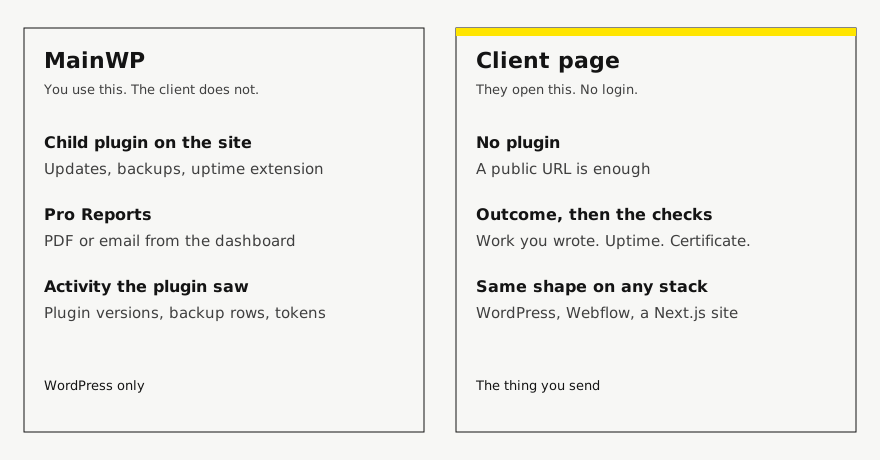
MainWP is a self-hosted dashboard. You run the MainWP Dashboard plugin on a site you control, and a child plugin on each client site. That is the point of it. The child plugin can see WordPress from the inside: updates, users, a lot of the activity a maintenance suite wants. I cannot see any of that. I request the public URL from the outside. If the homepage answers, I can say so. I cannot tell you which plugin changed.
On 13 October 2026 the MainWP pricing page showed Essentials as free, with the free add-ons and unlimited sites. Pro was $29 billed monthly, $199 billed yearly, and $599 once for lifetime. The page rendered the monthly and yearly layouts together, so I am quoting both cards, not a price I averaged. Pro said it includes the existing Pro add-ons, future add-ons, and priority ticket support, still with unlimited sites. A FAQ on that page repeated the $599 lifetime price and a 30-day money-back guarantee. Another answer said canceling stops access to critical updates, new extensions, and priority support. I did not see a per-site reporting fee on that page.
What Pro Reports needs before it can write anything
The Pro Reports extension page, the same day, was clear about the plumbing and silent about a separate price. Pro Reports works with the MainWP Child Reports plugin, and that plugin has to be on every child site or there is nothing to report. Child Reports requires PHP 7.4 or higher. You can install it from WordPress.org. Uptime gets into the report when the Advanced Uptime Monitor extension is also in use. The templates are PHP, HTML, and CSS. You can put a logo and brand colors on the report, save a draft, preview it, download a PDF, or email it from the dashboard. They mention a REST API for pulling data out. I looked for a price that was only for reports. There was not one. The page points you at MainWP Pro.
That missing line matters. I am not going to invent “reports cost $X.” The reporting extension rides on the Pro license I quoted above. If your reason for paying Pro is the report, you are paying for the whole extension bundle. If your reason for paying Pro is updates and backups, the report comes along, and you still have to decide whether the client should see it.
The pricing page also lists “Automatically Generate & Send Reports to Your Clients” in the client-management group, next to both the free and Pro columns, in a matrix that was hard to read. I will not tell you Essentials sends Pro Reports. Essentials is the free add-ons. Pro Reports is a Pro extension, and the extension page says to sign up for Pro. If a thinner free report exists, I could not pin it down from those two pages, so I am leaving it unmarked rather than guessing.
Why the PDF still fails the client
A Pro Report is fed by the child plugin. It is good at “here is what WordPress recorded.” It is bad at “here is why you are still paying me,” unless you rewrite it. The tokens will happily print update rows. The client already assumes you updated plugins. A version bump does not tell them the contact form works.
I have sent that PDF. The client said thanks, and at renewal they still asked what the retainer was for. The PDF had done its job as an operations log. It had not done the job of a letter. Those are different readers. You can love the log and still refuse to make it the only thing they ever see.
MainWP can white-label the child plugin’s name, on Pro, so the client’s plugin list does not say MainWP. That is a real feature and I am glad it exists. It does not fix the letter. A renamed plugin is still a plugin. The client who should not have a wp-admin login should not need one to read the month.
The split I actually use
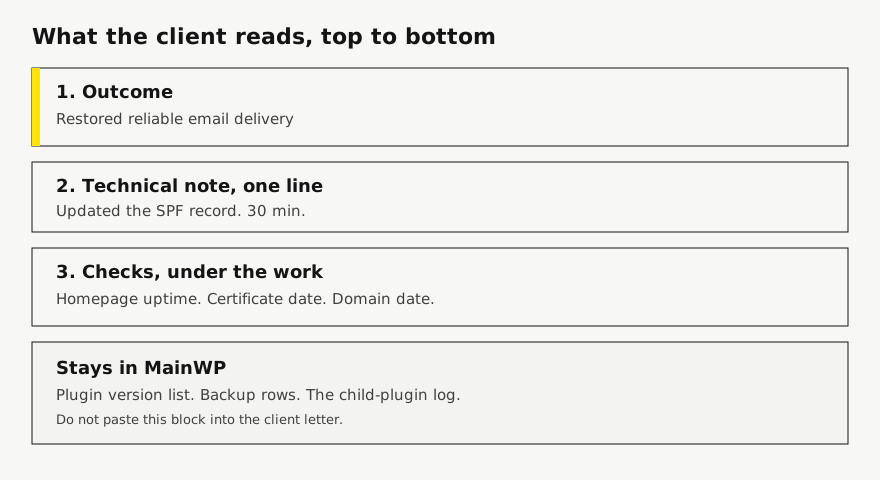
Copy this into the notes of a new retainer. It is a division of labor, not a feature matrix. Square brackets are the blanks.
Site: [https://example.com]
Stack: WordPress

MainWP, on the site:
- Child plugin installed. PHP is [version], at least 7.4.
- Updates and backups run here.
- Pro Reports stays available if I want the operations PDF for me.
- The client does not get a dashboard login.

Client page, not MainWP:
- One secret link. No account for them.
- Two or three outcome lines for the period.
- Under each line, one technical note if they might ask how.
- Uptime, certificate date, domain date.
- Plugin version rows stay in MainWP.

If the next site is not WordPress, MainWP does not get a vote.
The client page still does.
The non-WordPress case is the one that breaks a “MainWP is our reporting system” policy. A Webflow brochure and a Next.js marketing site have nowhere to put Child Reports. You then either invent a second reporting habit or you admit the client page was never the dashboard. I would rather admit it on the first WordPress site, so the second site does not invent a new format. That argument is written out on reporting beyond WordPress.
A month, written both ways
Harbor & Co is not a customer. I am showing the shape. The numbers are not a measurement.
What MainWP would be proud of:
Plugins updated: 14
Themes updated: 1
Backup: completed Tuesday
Uptime extension: 99.9%
PHP: 8.2
What I send instead. The updates still happened. They are not the letter.
Client: Harbor & Co
Site: https://harbor.example
Period: 1 March 2026 to 31 March 2026

Status: All clear. One short miss, named below.

Work this period:
- Restored reliable email delivery
  Technical note: updated the SPF record at the DNS host. 30 min
- Wholesale price list matches the PDF they sent
  Technical note: three numbers on the trade page. 20 min

Uptime: one miss on 3 March, about 20 minutes.
Certificate: 64 days left.
Domain: 288 days left.

Not in this letter: the plugin list. It is in MainWP if I need it.
The wording pattern, including the bad line and the better line, is on WordPress care-plan reporting. The blank you can reuse for a site that is not WordPress is the maintenance report template. The checklist with the public sample is the WordPress maintenance report.
Where RetainerProof is weaker, on purpose
I probe the homepage every 15 minutes by default, and as often as every 30 seconds if you set it. A dedicated monitor, and MainWP’s uptime extension if you point it at one, will notice a short outage I can miss. If the retainer promises “we know within a minute,” keep that monitor. Do not cancel it because a care report also has a percentage on it.
I do not reconstruct the child-plugin activity stream. If you want “deleted 40 spam comments” to appear by itself, Pro Reports will do that and I will not. My work log is lines you write, or lines a script posts to the write API. Nothing on the server is reporting back. A Cloudflare challenge is marked unverifiable, not as downtime.
The client page is a secret link. They do not get a login. Your studio name and accent lead it on every plan. Starter keeps a small Powered by RetainerProof link. Studio and Agency take that link off the report and off the public status page. That is the white-label switch. It is not a renamed child plugin, and there is no per-site reporting add-on on top of the plan.
A public status page is optional and thinner than the report. Current state, incidents from the last 90 days, no work log. MainWP’s own monitoring story, on the pricing page, is that you can watch uptime through UptimeRobot, NodePing, Site24x7, and Better Uptime. I am not those. If you already pay one of them inside a MainWP setup, leave it. The status page notes, including hostnames, are on white-label status pages.
When I would stay on MainWP alone
Stay if every site is WordPress, the client is happy opening a PDF of update rows, and you already rewrote the Pro Reports template so the first page is an outcome instead of a changelog. You do not need a second product to feel modern.
Stay if the thing you sell is “we update and back up these WordPress sites,” and the client has never asked a question the PDF did not answer. Ripping out a working dashboard to paste the same facts somewhere else is busywork.
Leave the client letter somewhere else when any of these are true. The client should not have a wp-admin login. The next site is not WordPress. You are tired of maintaining a PHP report template so the first sentence is in the client’s words. You want the same link next month, with the new period on it, instead of another attachment. That page is the one described in website maintenance reporting for agencies.
What I tell the client the first time
I do not mention MainWP. They did not buy MainWP. I send a short note: the top of the page is what I changed, underneath is whether the site was up and when the certificate and the domain expire, and the link will be the same next month. If I have to explain a child plugin, I have already handed them my tools instead of the work.
If they ask for the plugin list later, I can still export it. It is a follow-up, not the report. The mistake is leading with it because it was easy to generate.
Start a client website report on one WordPress site where MainWP can keep doing the updates. If you wanted a new dashboard, this is the wrong signup.
FAQ
Is RetainerProof a MainWP alternative for updates and backups?
No. MainWP updates WordPress and can back sites up. RetainerProof does not install a child plugin, does not update plugins, does not take backups, and does not run a security scan. The overlap is the page the client opens.
What are the MainWP alternatives if I want a different dashboard?
InfiniteWP, if you want another panel on a server you run. ManageWP or WP Umbrella, if you want that panel hosted. Read their current prices before you move. I am not those products, and I will not invent a feature they have that I do not.
Can I keep MainWP and still change the report?
Yes. Leave updates and the activity log in MainWP. Send a separate link whose first lines are the work, then uptime, the certificate, and the domain. The client does not get a dashboard login.
Where is a filled example of the page you would send?
The Harbor & Co sample at /demo. Harbor & Co is not a customer. The numbers on it are sample data, not a result from a live client site.
Plans are Starter at $9/month for up to 5 sites, Studio at $29/month for up to 25 sites, and Agency at $79/month for up to 100 sites. Starter, including a trial, keeps a small Powered by RetainerProof link on the client digest and the public status page. Studio and Agency remove that link. Prices are on the pricing page.
Related guides
- Reporting for agencies
- Beyond WordPress
- Maintenance report template
- ManageWP alternative
- Uptime report
- Prove retainer value
- Care-plan reporting
- Client status pages
- Quiet-month emails
- Reporting tools
- ManageWP alternatives
- Contract template
- Annual review
- Status page comparison
- Client work log
Also see pricing and a sample client digest.
Monthly agency tip
One tip a month.
One practical tip a month on proving your retainer is worth it. No spam.
I email a confirmation link before I add you. I store the address, this page, and the date. Unsubscribe any time. Read the privacy page.