Guide
ManageWP alternative: keep the dashboard, change the report
Five of the names below update WordPress. RetainerProof does not, so it is last. I read their public pricing and report pages on 22 October 2026. A number that was not on the page is not in this one. Roundups usually stop at the feature list. The question they skip is further down: do clients read the monthly report at all?
What a ManageWP alternative is usually selling
The first pages for “ManageWP alternative” are other WordPress dashboards: WP Umbrella, MainWP, InfiniteWP, WP Remote. They compare updates, backups, and a price per site. If that is the job, use the sections below and ignore the signup. RetainerProof is not an updater. If the job is that clients do not read the PDF, a new dashboard reprints the same log in a new skin.
MainWP alternatives are the same kind of list
A search for a MainWP alternative lands on the same roundups. MainWP is the self-hosted row here. The longer note, including what Pro Reports needs before it can write a page, is the MainWP alternative for the client report. Keeping MainWP, or keeping ManageWP, and changing only the letter is a valid outcome. The roundups treat that as a footnote. It is the outcome I actually use.
What stays in the dashboard, and what you send
Copy this into the notes for a retainer that already has ManageWP or MainWP. Square brackets are the blanks. Delete a line that is not true.
Dashboard, stays:
- Updates, backups, and the activity log live here.
- The client does not get a login to this dashboard.
- Tool: [ManageWP / MainWP / the one you already run]

Client page, the thing you send:
- One secret link. No account for them.
- Two or three outcome lines for the period.
- Under each line, one technical note if they might ask how.
- Uptime, certificate date, domain date.
- Plugin version rows stay in the dashboard.

If the next site is not WordPress, the dashboard does not get a vote.
The client page still does.
The shape of that page is the Harbor & Co sample. Harbor & Co is not a customer. The lines on it are sample entries, not a client of mine. A plugin version list is not the first screen.
ManageWP
ManageWP is a hosted dashboard for many WordPress sites. The pricing page says the core stays free on unlimited websites, and that list includes client reports and a monthly cloud backup. Premium add-ons are per site, billed after you use them. The page says there is no setup fee and no long-term contract. Backups as a premium add-on were $2 per site, or $75 for a bundle of up to 100 sites. An all-in-one package of the bundles was $150.
The client-report page splits the letter in two. Free was $0 a month: a logo, a custom work section, a PDF, 25 or more languages, a ManageWP watermark, and mail from a ManageWP address. Premium was $1 a month per site, or $25 a month for up to 100 sites. Premium takes the watermark off, sends from your address, and can schedule weekly, bi-weekly, or monthly, including a bulk send. The pricing page lists Advanced Client Reports at that same $1 and $25. White Label is a different line on the pricing page, also $1 and $25. I am not treating “watermark off” and “white label” as the same switch.
It is good at updates, backups, and a report that can include a block you write. It is for agencies that live in that dashboard and want the PDF to come from the same place. A site that is not WordPress has nothing for it to attach to. The shorter split is ManageWP client reports.
MainWP
MainWP is the self-hosted dashboard. You run it. The pricing page showed Essentials as free, with unlimited sites, and Pro at $29 billed monthly, $199 billed yearly, and $599 once for lifetime. Monthly and yearly were both on the page, so I am quoting the cards. A FAQ repeated a 30-day money-back guarantee. Another answer said canceling stops critical updates, new extensions, and priority support.
Pro Reports, on its own page the same day, needs the Child Reports plugin on every child site. That plugin needs PHP 7.4 or higher, and it can be installed from WordPress.org. You can add a logo and brand colors, save a draft, preview, download a PDF, or email it from the dashboard. Uptime gets into that report when the Advanced Uptime Monitor extension is also in use. The templates are PHP, HTML, and CSS. They mention a REST API. I did not find a price that was only for reports. The page points you at MainWP Pro.
The pricing matrix also puts “Automatically Generate & Send Reports to Your Clients” where both Free and Pro appear. I will not tell you Essentials sends Pro Reports. If a thinner free report exists, those two pages did not separate it, so that detail stays unverified. It is good at bulk updates on a server you control, with one Pro price instead of a fee per site. It is for agencies that want that, and that are willing to keep a child plugin on each WordPress site. The working notes are on the MainWP page.
WP Umbrella
WP Umbrella is a hosted, per-site care tool. The pricing card printed both 1.99€ and $2.19 per site per month. I am not converting one into the other. White-label client reporting is in that base price. A FAQ on the same page says the €1.99 subscription includes the white-label client reports, and that the only extras are the security add-on and hourly backups. Those were 2€ or $2 per site per month, and 2.49€ or $2.49 per site per month. The trial is 14 days, no card. They say they will not auto-charge a card they do not have. You can cancel at any moment. A yearly prepay is an automatic 10% discount.
It is good at one number per WordPress site that already includes backups, updates, monitoring, and a branded report. It is for agencies that want that number and do not want a report add-on on top. I am not repeating the quotes or the customer counts printed on that page. The direct comparison is RetainerProof vs WP Umbrella.
InfiniteWP
InfiniteWP is a self-hosted admin panel. The pricing page says the free panel is 1-click admin access, 1-click updates, and backup and restore, and it describes those as free for unlimited sites. Paid licenses are a different list, and the page does not agree with itself about them. The FAQ’s own upgrade example is Starter at $147 and Developer at $247, and it spells the difference as $100. That FAQ sets the caps at 10, 20, 50, unlimited, and an infinite number of sites. The first card row matches that, at $147, $247, $347, $447, and $647 a year. A second grid on the same URL shows other prices, including Agency at $397 and $497 a year for 100 sites. I am not choosing an Agency price. They print a refund within 14 days of purchase, and licenses auto-renew yearly.
Client Reporting, on the addons index the same day, was $127 a year. The addon’s own page described weekly or monthly reports, a PDF or an email from the dashboard, notes in the header and footer, and a logo. That page did not render a price, so the $127 is from the index, not from a blank I filled in. The features page puts the client-reporting block with the premium plans. I am not calling the report free. It is good at bulk WordPress work on your own server, and at a report of the events that server recorded. It is for agencies that already want that panel and will look at the cart before paying, because the two grids are not the same offer.
WP Remote
WP Remote is a hosted, per-site suite. The free card is labeled Development / Microsites, with updates, uptime, and single sign-on. I am not quoting a dollar amount for it. The $0 on that page sat on a quantity control, not on the free card. Essential was $1.99 per site a month, and $19.99 per site a year. Premium was $4.99 and $49.99. Advanced was $19.99 and $199.99. The Essential list includes whitelabeled reports: a branded email or PDF sent from your address. The comparison table marks Client Reports as whitelabeled on Essential, Premium, and the column it heads “Advance.” I did not see a price that was only for the report.
I am leaving out backup retention, staging length, and the add-on prices. The same page printed more than one figure for those lines, and I will not pick the generous one. The refund is the same kind of split. A short line says they will refund within 14 days. The FAQ says the refund is if the tool failed, and that a cleanup of malware during those 14 days means no refund. There is no setup fee. Prices are in USD. Over 100 sites, the page says to talk to them. It is good at hosted updates, backups, and a branded report inside the paid site plan. It is for agencies that will read the cart, because the marketing page is not one price list.
RetainerProof
I do not update plugins, I do not take backups, and I do not install anything on the site. If the URL is public, I can check it, including a site that is not WordPress. Homepage probes run every 15 minutes by default, and as often as every 30 seconds if you set that per site. You write the work. The client opens one secret link and does not get an account. A public status page is optional. It shows current state and probe incidents from the last 90 days. It does not include the work log. Your name leads every plan. Starter keeps a small Powered by RetainerProof link. Studio and Agency remove that link on the report and on the status page. There is no per-site report fee.
It is for the person who pays the retainer and should not have a wp-admin login. Keep whichever dashboard above already updates the site. This is the page you send. If you wanted a new updater, skip the signup. The prices are the three monthly plans in the last paragraph.
The prices, and nothing else
| Tool | What it is good at | Price I will quote | Who it is for |
|---|---|---|---|
| ManageWP | Hosted WordPress updates, backups, and a report with a block you can write. | Free report $0. Premium $1 per site a month, or $25 a month up to 100 sites. | Agencies that want the PDF from the same dashboard that updates the sites. |
| MainWP | Self-hosted updates. Reports need Pro and the Child Reports plugin. | Pro $29 a month, $199 a year, or $599 lifetime. No separate report price. | Agencies that want the dashboard on their own server. |
| WP Umbrella | Per-site care, with white-label reports in the base price. | 1.99€ and $2.19 per site a month, both printed. Security and hourly backups are extra. | Agencies that want one number per WordPress site. |
| InfiniteWP | Self-hosted updates and backups. Client reporting is a paid addon of recorded events. | Client Reporting $127 a year on the addons index. FAQ example: Starter $147, Developer $247. Agency price not quoted. | Agencies that self-host the panel and will check the cart. |
| WP Remote | Hosted per-site updates, with whitelabeled email or PDF reports on the paid cards. | Essential $1.99 a month or $19.99 a year. Premium $4.99 or $49.99. Advanced $19.99 or $199.99. Per site. | Agencies that want a hosted suite and will ignore the add-on figures that disagree. |
| RetainerProof | The client page. Outside checks, work you write, optional status page. Not an updater. | The three monthly plans below. No per-site report add-on. | The client who should not get a login, beside any of the tools above. |
Do clients read the monthly report?
That is the question the comparison posts skip. They rank dashboards. Agencies, in public, are arguing about something else: the month nothing broke, and a PDF nobody opened. I read three threads on 22 October 2026. reddit.com blocked a direct fetch, so the wording is from the Arctic Shift archive of those threads. I am quoting the comments, not a study, and not anyone’s clients of mine.
On 29 August 2025, in r/Wordpress, the post was “How do you show clients the value of WordPress maintenance when nothing breaks?” The writer maintains 100 or more WordPress sites and says the better the work, the less visible it looks. The thread. OrganicClicks, the same day, sends a simple monthly report of uptime, updates applied, and issues prevented, and says clients usually do not care about the how. They care when they see a log of things fixed before those things became problems. kube1et, the same day, had the opposite warning: if you want them to feel they are wasting the money, send a report that says 100% uptime and no issues.
On 29 August 2026, in r/Wordpress, someone asked what to use for a plain-language monthly report. That thread. BDer8 wrote: “ManageWP can do this but we stopped because the clients didn't read them.” TopSydeWP, the same day, still pulls numbers from MainWP or ManageWP, then writes three or four sentences at the top of a Google Doc about what mattered, and puts the automated stats in an appendix. They said clients read that, because it is not a wall of metrics, and that the writing takes about ten minutes a site once the template exists.
On 6 May 2026, in r/web_design, a new agency asked what a non-technical client actually wants in a monthly report. That thread. Extra-Diamond5803, on 8 May, said a report matters for retention, because they keep meeting people who were paying a maintainer and could not tell you what the fee was for. They use MainWP for the sites and the reporting, and they named ManageWP as another place to do the management. That is a vote for sending something. It is not a vote for sending the plugin log unchanged. BDer8 already tried that and stopped.
The price tables on this site, including WordPress client reporting tools, answer which product can emit a report and what I could read on the pricing page. They do not answer BDer8. A ManageWP premium report can be scheduled and stripped of the watermark, and the client can still not read it. The part TopSydeWP added by hand is the part the suites do not invent for you: three or four sentences about what mattered.
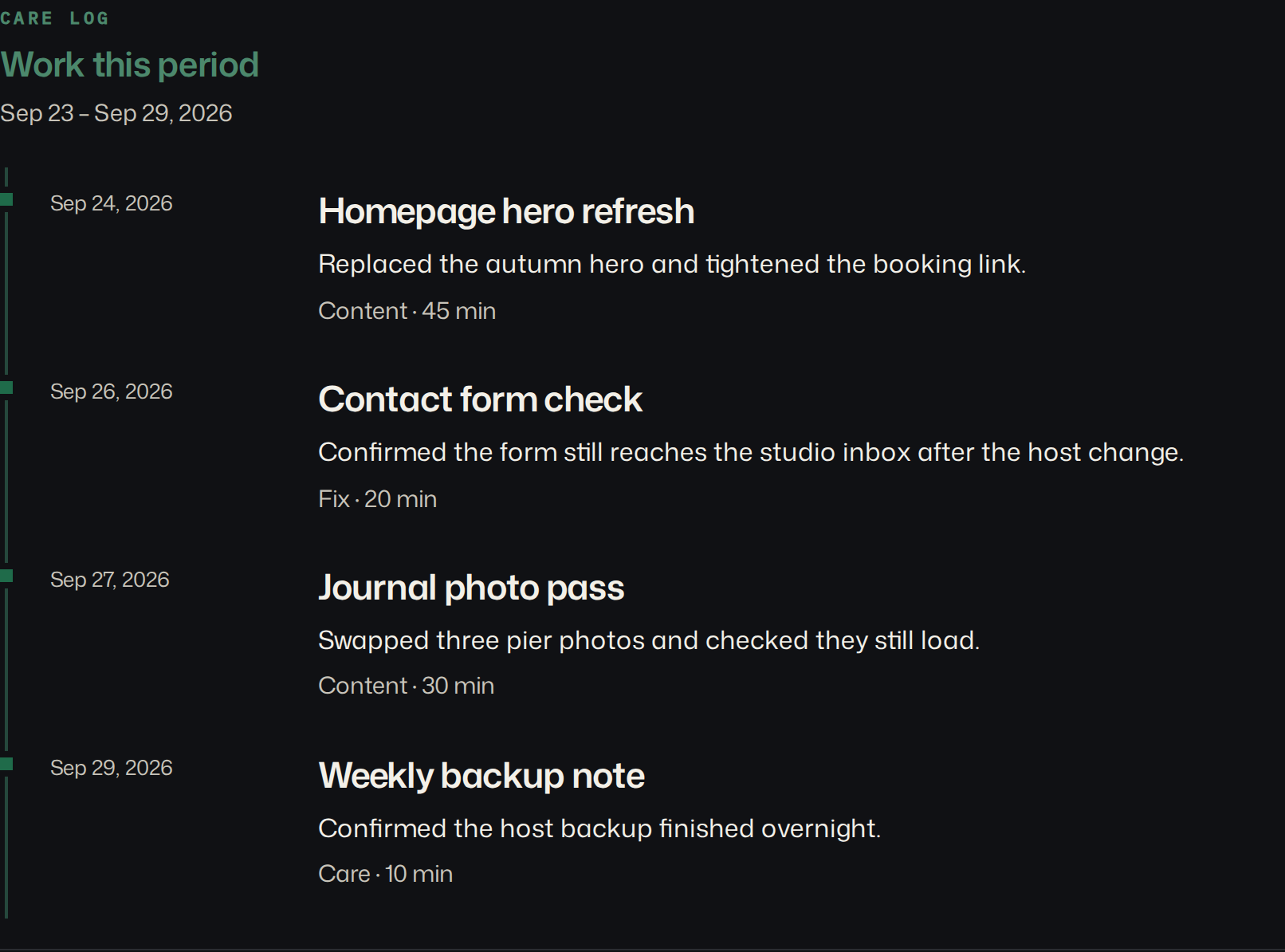
That shot is the sample digest, the one at /demo. Harbor & Co is fictional. Northwind Web Studio is the sample studio name. The four lines are not a measurement and not a client of mine. They are the page a client can read without knowing what a plugin is: a hero was replaced, the contact form still arrives, three photos were swapped, the host backup finished. The tag and the minutes are underneath, for the person who wants them. A plugin version list is not on this screen.

The uptime block is the check, not the letter. On the sample it says 99.4%, reached on 332 of 334 checks, every 15 minutes, and it marks 24 September as a short miss. That is a fact the probe recorded. It is also exactly the shape kube1et said will not carry a retainer, if you send it alone. The status line above it on the same page says “All clear” and “1 short miss,” and the summary says the miss recovered the same morning. I am not claiming a client read it. I am claiming the page has a sentence, and then the number, which is the order TopSydeWP described. The suites can still produce the appendix.
If you log nothing for the period, the work section is left off. The client then gets the checks. That is an honest quiet month only if your email says you watched the site and did not change it. The product will not write that sentence. A generated “100% uptime, no issues” is the cancellation note, and buying a different dashboard does not fix the sentence. How to write the lines is on care-plan reporting. What the WordPress page should contain, with this same sample, is the WordPress maintenance report.
FAQ
Is RetainerProof a ManageWP alternative for updates and backups?
No. ManageWP, MainWP, WP Umbrella, InfiniteWP, and WP Remote update WordPress. RetainerProof does not update plugins, take backups, or install a plugin. It is the page the client opens, and it can sit beside any of them.
Do clients read monthly maintenance reports?
Some agencies say no. On 29 August 2026 a commenter said they stopped sending ManageWP reports because clients did not read them. Another, the same day, said clients read a three or four sentence summary and ignore a wall of metrics. I have not measured a read rate, and I am not going to invent one.
Can I keep my current dashboard?
Yes. Keep the tool that updates the site. Send the client a separate page whose first screen is the work, then the checks. The dashboard login stays with you.
Why are some prices missing?
The vendor page did not settle them on 22 October 2026. InfiniteWP showed two price grids, so there is no Agency figure here. WP Remote printed conflicting add-on and storage numbers, so those are omitted. A blank is not a zero.
Which RetainerProof plan takes the product link off?
Studio at $29 a month and Agency at $79 a month. Starter at $9 a month keeps a small Powered by RetainerProof link on the digest and on the public status page.
Is there one MainWP alternative that replaces the dashboard and the letter?
Not on this page. InfiniteWP is the other self-hosted panel. ManageWP and WP Umbrella are hosted. RetainerProof does not replace the dashboard. It is the page you send while one of those keeps doing updates. I do not update plugins, take backups, or run security scans.
Start a client website report on one site the dashboard already maintains. If the missing piece is bulk updates, use the table and ignore the signup.
Plans are Starter at $9/month for up to 5 sites, Studio at $29/month for up to 25 sites, and Agency at $79/month for up to 100 sites. Starter, including a trial, keeps a small Powered by RetainerProof link on the client digest and the public status page. Studio and Agency remove that link. Prices are on the pricing page.
Related guides
- Reporting for agencies
- Beyond WordPress
- Maintenance report template
- ManageWP alternative
- Uptime report
- Prove retainer value
- Care-plan reporting
- Client status pages
- MainWP alternative
- Quiet-month emails
- Reporting tools
- Contract template
- Annual review
- Status page comparison
- Client work log
Also see pricing and a sample client digest.
Monthly agency tip
One tip a month.
One practical tip a month on proving your retainer is worth it. No spam.
I email a confirmation link before I add you. I store the address, this page, and the date. Unsubscribe any time. Read the privacy page.