Guide
UptimeRobot, Pulsetic, and a status page that is not the care report
People shop for a status page when a client asks “is it down?” on a Sunday and the only answer is your inbox. UptimeRobot and Pulsetic are built for that question. RetainerProof answers a different one, which is what you did for the retainer, and it happens to include a thinner public page. If you cancel a one-minute monitor because a care report also shows uptime, you have bought the wrong savings.
I read the public pages on 13 October 2026. Prices below are the ones those pages printed that day. Where a page showed two numbers, I am quoting both. Where a page contradicted itself, I am saying so, and I am not picking the generous reading. I am not repeating review scores or logo walls. They were on some of these sites. They are not a measurement I made.
What each one is for
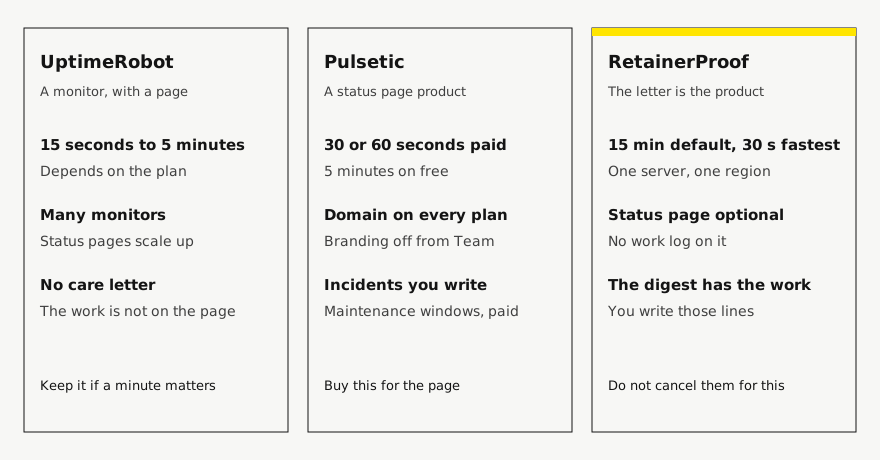
UptimeRobot is an uptime monitor that also publishes status pages. The pricing page is organized by monitor count and check interval. The status page is a feature of the plan, not the reason the plan exists. Pulsetic sells monitoring too, and it spends a whole marketing page on the status page itself: custom domain, incident updates, maintenance windows, subscribers. RetainerProof is a client website report. The public status page is optional, per site, and it does not contain the work log. The work lives on the secret digest. If your search was “a page the client can refresh during an outage,” the first two are the category. If your search was “a page that explains the month,” you are in the third column, and you may still want one of the first two beside it.
The uptime section of the care report, which is not the same object as a status page, is described on the client website uptime report. Hostnames and the product credit are on white-label status pages. I am not going to repeat those. This page is the comparison I wished I had when a client forwarded me a Pulsetic link and asked why we were not “just using that.”
UptimeRobot, as the pricing page showed it
On the UptimeRobot pricing page, the free plan was $0 a month, 50 monitors, a 5-minute interval, and basic status pages. The comparison row counted status pages as 1, then 3, then 100, then unlimited. Solo, on the 10-monitor card, showed $13 and $12 a month at the same time, and the comparison header said “Starts at $144/y”. Team showed $46 and $39 a month, and the comparison said “$468/y”. Scale, on the 200-monitor card, showed $98 and $79 a month, and the comparison said “Starts at $948/y”. The page also said annual billing saves about 15%. I am not collapsing each pair into one price. Their own machine-readable pricing file, the same day, said it was an EUR geo snapshot and that other geos can show different numerals, so I will not tell you these USD figures are the only ones on earth. They are the ones the HTML page gave me.
Intervals on that comparison were 5 minutes, 60 seconds, 30 seconds, and 15 seconds, from free through Scale. Solo’s status pages include custom design, your own domain, and translations. Password protection, a whitelabeled page, subscribers, search-engine opt-out, and status-page analytics start on Team, not on Solo. The free plan does not get the custom domain. Login seats on Team and Scale were listed as “add for $15/19 / mo.” I am leaving that pair as printed.
The free card and the rest of the page did not agree about SSL. The free card listed SSL and domain expiry, and also API monitoring, UDP, DNS, location-specific checks, and slow-response alerts. A comparison note said SSL monitoring is included only in paid plans. The machine-readable file said the free plan does not include SSL, domain expiry, API, UDP, multi-location checks, or DNS. Both documents were public on the same day. I will not tell you the free plan includes SSL. If you are choosing free because of the certificate date, read the comparison row yourself before you rely on the card.
Their FAQ, on that pricing page, said they offer a 14-day money-back guarantee on new subscriptions and upgrades, and that you cancel by turning off auto-renewal. The subscription stays active until the end of the billing cycle. That is their policy, not mine. I am not offering you their refund.
Pulsetic, as the pricing page and the status page showed it
Pulsetic’s pricing page, the same day, showed Free at $0 a month, Solo at $9 a month, Team at $19 a month, and Organization at $49 a month. Next to Team it also printed “Instead of $39”. Next to Organization it printed “Instead of $69”. I do not know whether those higher numbers are a crossed-out list price or a comparison. They were on the page, so I am not dropping them, and I am not treating them as the price you pay. The yearly block said it saves 2 months, and it showed Solo at $90 a year, Team at $190 a year with “Instead of $390”, and Organization at $490 a year with “Instead of $690”.
Status pages were 3 on free and unlimited after that. A custom domain was marked yes on every plan, including free. Their status-page page said the same thing in prose, and it said to use a subdomain because a CNAME cannot sit on the root next to the records a root already has. Whitelabeled, meaning Pulsetic branding off, was Team and Organization. Solo at $9 is where they said customization starts: logo, colors, layout. Incident updates, scheduled maintenance, subscriber notifications, status badges, password protection, and search-engine opt-out were paid, from Solo. The status-page FAQ repeated the $9 and the $19. I am using those sentences because they match the pricing cards, not because a FAQ outranks a price.
Check intervals on the pricing matrix were 5 minutes on free, 60 seconds on Solo, and 30 seconds on Team and Organization. Monitors were 10 on free, then 10+, 50+, and 300+, with extra monitors at $0.20. Teammates were $8. Extra status-page subscribers were $0.01. Included subscribers were 1,000 on Solo, 5,000 on Team, and 10,000 on Organization, according to the status-page page. History was 3 months on free, one year on Solo and Team, and five years on Organization. The payment FAQ said the original order can be refunded if you ask within 20 days, and renewal orders are not refundable. Again, their policy.
Pulsetic will let you write incident updates and announce a maintenance window, on a paid plan. That is a real editorial status page. Mine is not. If the client needs a sentence during an outage that is not “unreachable since 14:02,” buy the tool that has the sentence. Do not wait for me to grow one and then be annoyed that the probe line is all there is.
What RetainerProof’s status page actually is
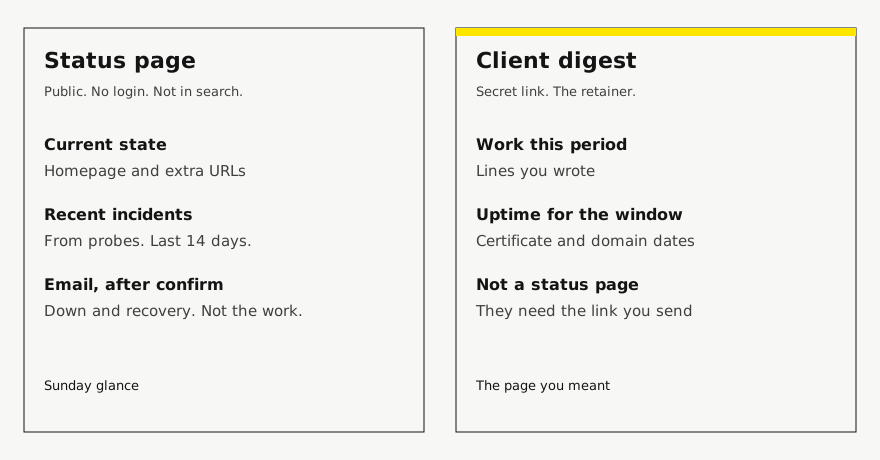
It is one public page per site, off until you turn it on. It shows the current state, the URLs you are probing, and recent incidents from those probes, over the last 90 days. An incident here is a stretch where the probe could not reach the URL. It is not a comment, a root-cause writeup, or a maintenance notice you drafted. There is no password on the page. There is no language picker. The page is kept out of search results, so it is a link you hand someone, not a page I am trying to rank. Someone can subscribe with an email. We send a confirmation first. After that, one message when the site goes down and one when it recovers, not one email per probe.
The work log is not on it. Alert addresses are not on it. The secret digest URL is not on it. The digest is where “Work this period” lives, next to uptime for that window, the certificate date, and the domain date. If you send the status link and call it the report, you have sent the Sunday glance and skipped the retainer. I have watched people do that because the status URL felt more “product.” The client then asks, at renewal, what the month was for. The status page cannot answer.
Homepage probes run every 15 minutes by default. You can set a site to 30 seconds, or 1, 2, 5, 30, or 60 minutes. The probes come from one server, with no second region to confirm a failure. UptimeRobot’s paid intervals, on the page I read, were 60, 30, and 15 seconds. Pulsetic’s paid intervals were 60 and 30 seconds. A fifteen-minute probe can miss a short failure entirely, and it will be late on a long one. Keep a faster monitor where a minute matters. The care report can sit next to it and still be the thing you send at the end of the month. The fuller check, the one that feeds the digest, is daily, twice daily, weekly, or monthly. It is not the status page refreshing.
Your studio name leads the status page on every plan. Starter keeps a small Powered by RetainerProof link, including on a trial. Studio and Agency remove that link on the status page and on the digest. There is no per-page fee and no per-domain fee on top of the plan. A hostname such as status.client.com is possible: a CNAME, a TXT record we check, and then the hostname has to be attached where the proxy can obtain a certificate. That last step is operational, on our side, not a checkbox the client completes alone. I am not going to describe it as “one CNAME and the page is live,” because that would be Pulsetic’s sentence, and our setup still has the certificate step. The notes are on custom domains.
An app pack is a different status page. It groups up to three services, such as an API, a database, and a frontend, and it does not send a care digest and does not use a site slot. It is not a second Pulsetic. It is a small public board for an app you run. The client website still wants the digest.
The rows I am willing to put in a table
Empty cells would be a lie. If I did not see it, the cell says so. “Better” is not a column.
| Question | UptimeRobot | Pulsetic | RetainerProof |
|---|---|---|---|
| Check interval I could read | 5 min free, then 60s, 30s, 15s | 5 min free, then 60s, 30s, 30s | 15 minutes by default, down to 30 seconds per site |
| Status pages | 1 / 3 / 100 / unlimited | 3 on free, then unlimited | One per site, optional. Not a monitor bundle. |
| Your domain | From Solo, not on free | Every plan, including free | Yes, with a CNAME, a TXT check, and a certificate step |
| Their branding off | Team and Scale | Team and Organization, from $19/month | Studio and Agency remove the link. Starter keeps it, including a trial. |
| Incident text you write | Comments and root cause from Team. Free and Solo: can’t comment. | Incident updates from Solo | No. Incidents are probe stretches. No maintenance window. |
| Price I will quote | Free $0. Solo card $13 and $12/month, “Starts at $144/y”. Team $46 and $39, “$468/y”. Scale card $98 and $79, “Starts at $948/y”. | Free $0. Solo $9/month or $90/year. Team $19/month or $190/year. Organization $49/month or $490/year. Higher “Instead of” figures were also printed. | The three monthly plans in the pricing section. No per-status-page add-on. |
How I would choose
If the job is “tell me in a minute, from more than one region, and page someone,” I would not buy RetainerProof for it. UptimeRobot’s Scale interval was 15 seconds, with multi-location called out as a paid monitoring feature, and Pulsetic’s Team and Organization listed 15 region checks. I do not do multi-location probes, SMS, or voice calls. I email. Pretending otherwise wastes a Sunday.
If the job is a status page on the client’s subdomain, with a logo, a maintenance notice, and subscribers, Pulsetic’s free plan already includes the domain and three pages, and $9 is where the page starts to look like them. UptimeRobot’s own domain starts at Solo, and the whitelabel starts at Team. Read the current card before you assume the free page is presentable. Free pages are often fine for you and embarrassing for a client. That is a taste judgment, not a price.
If the job is the retainer, neither of those pages includes the work you did. A green status page is not a care plan. The agreement that says what the month includes is the care plan agreement. The status page can be the link in the footer of the letter. It should not be the letter. I would keep UptimeRobot or Pulsetic, or whatever one-minute tool you already trust, and I would send the digest for the month. Two tools, two readers. The mistake is choosing one and demanding it perform the other job.
MainWP’s pricing page, which I read the same day for a different article, says you can monitor uptime through UptimeRobot and a few others. That is a sensible split, and it is the same split I want here. The dashboard or the monitor watches. The client page explains. The longer MainWP version is the MainWP alternative for the client report. It is not a status-page review, and I am not repeating the Pro prices here.
What I left out
Enterprise quotes, because UptimeRobot’s enterprise plan had no public price. Pulsetic add-ons I did not need for the status-page question, beyond the three unit prices above. Any feature I could not find on the page I named. A winner. If the pages move next week, the numbers in this article move with them only when someone reads them again. Until then, treat 13 October 2026 as the date, and click through before you put a figure in a proposal.
Plans are Starter at $9/month for up to 5 sites, Studio at $29/month for up to 25 sites, and Agency at $79/month for up to 100 sites. Starter, including a trial, keeps a small Powered by RetainerProof link on the client digest and the public status page. Studio and Agency remove that link. Prices are on the pricing page.
Related guides
- Reporting for agencies
- Beyond WordPress
- Maintenance report template
- ManageWP alternative
- Uptime report
- Prove retainer value
- Care-plan reporting
- Client status pages
- MainWP alternative
- Quiet-month emails
- Reporting tools
- ManageWP alternatives
- Contract template
- Annual review
- Client work log
Also see pricing and a sample client digest.
Monthly agency tip
One tip a month.
One practical tip a month on proving your retainer is worth it. No spam.
I email a confirmation link before I add you. I store the address, this page, and the date. Unsubscribe any time. Read the privacy page.