Template
WordPress maintenance report
A WordPress maintenance report is the page you send for the month. The client opens it without a login and sees what you finished, whether the site was up, and when the certificate and the domain expire. When the site is not WordPress, the same page is a website maintenance report. The sections do not come from wp-admin.
The guides at the top of both searches open with plugin updates, a backup count, and a security scan. Those are real lines if you did the work. They are not the report, and this product will not invent them. I do not update plugins, I do not take backups, and I do not scan for malware. If you did one of those jobs, write the outcome. If you did not, leave the section off.
Plugin version numbers are a log for you. They can stay in ManageWP, MainWP, or wp-admin, and the MainWP alternative for client reporting is what the client should see instead of that log. They make a poor first screen. The client already assumes you updated plugins. They still ask what the month was for.
What to put on the page
Who it is, and which month
The client name, the site URL, the period, and your studio. They should know whose report it is before they read a number.
One status line
All clear, or the one thing that needs a look. A paragraph of caveats is a second report.
The work, as an outcome
Write the line the client would repeat. Put the technical event under it, in one line, if they might ask how. “Restored reliable email delivery” over “Updated DNS.” If you updated plugins and the client felt nothing, one clause is enough when the care plan promised updates. How to rewrite a weak line is on care-plan reporting.
Uptime for the period
Homepage checks, including a short miss. Name the day if you have it. A green badge with no dates is how a bad Tuesday shows up later, without you.
Certificate and domain dates
Days left, and the expiry date. These are facts you can read from the outside. A security grade you did not measure does not belong on the page.
The URLs you actually watch
Contact, checkout, booking. Not every URL on the site. On a RetainerProof digest that list stops at 12.
One performance snapshot, if you have one
Label it as a mobile Lighthouse snapshot. It is not a security audit, and it is not a lecture.
A homepage shot, if you have one
So they can see the page, not only a percentage. Say whether it changed since the previous period.
What to leave out
- A dump of plugin and theme version numbers.
- A malware or vulnerability claim you did not run.
- A backup percentage you did not open. If you checked that the host backup finished, that is a work line. A made-up success rate is not.
- A wp-admin login. The person who pays does not need one to read the month.
The same leave-out list, without the WordPress examples, is what to include in a website maintenance report. The blank that is not tied to WordPress is the website maintenance report template.
The sections in one table
| Section | The client’s question | Keep it to |
|---|---|---|
| Status line | Do I need to worry? | One sentence |
| Work this period | What did I pay for? | Two to six outcome lines |
| Uptime | Was it there when customers looked? | A percent, the check count, the day of any miss |
| Certificate and domain | Is anything about to expire? | Days left and the date |
| Watched URLs | Do the pages that make money work? | One line per URL |
| Lighthouse snapshot | Is it getting slower? | Four numbers, labelled mobile |
When to send it, and what to write in a quiet month
The pages that rank for this search list sections. None of the three I read on 25 October 2026 says when the report should land, or what to put in it when the month was only chores. Those are the two things people who send these argue about in public.
On timing: in an r/Wordpress thread from July 2025, dschultzie sends the report on the 2nd of each month, the same day as the invoice, and says clients have paid faster since. Adlien_, in the same thread, attaches the report to the invoice. That is two people, not a study. It still makes sense to me. The invoice is the moment the client asks what the money was for, so the answer should be in the same email, not three days later.
On the quiet month: guyinpv, same thread, writes “Maintenance successful for August” when the month was only the normal chores. That line is honest. It is also the line that makes a retainer look optional. The wider version of this, for an agency with many clients, is website maintenance reporting for agencies. I would add the one thing you checked that the client cares about, such as the contact form still arriving, and let the uptime and the dates carry the rest. Do not invent work to fill the page.
On jargon: asked about an auto-generated PDF, jroberts67 said it would read like Klingon to their clients and they would get calls asking what it meant. A report that creates support calls costs you time. That is the practical reason the work lines come first and the version numbers stay in your dashboard.
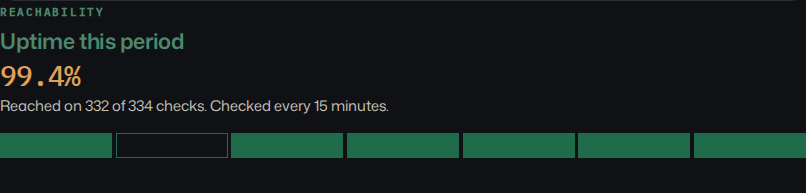
A sample report
This is the public sample, Harbor & Co, for the period ending 29 September 2026. Harbor & Co is not a customer. The figures below are the ones on that page. They are sample data, not a result I measured on a live client site, and not a benchmark.
The sample does not name a CMS. That is fine. These sections do not come from wp-admin.
Client: Harbor & Co
Site: https://harborandco.example
Period ending: 29 September 2026
Prepared by: Northwind Web Studio

Status: All clear. One short miss.
Summary: Homepage, TLS, and domain are healthy. One short miss on Thursday recovered the same morning.

Work this period:
- Homepage hero refresh
  Replaced the autumn hero and tightened the booking link. Content. 45 min. 24 September 2026.
- Contact form check
  Confirmed the form still reaches the studio inbox after the host change. Fix. 20 min. 26 September 2026.
- Journal photo pass
  Swapped three pier photos and checked they still load. Content. 30 min. 27 September 2026.
- Weekly backup note
  Confirmed the host backup finished overnight. Care. 10 min. 29 September 2026.

Uptime: Reached on 332 of 334 checks (99.4%). The day with a miss is 24 September 2026.
Certificate: 74 days left, expires 12 December 2026.
Domain: 186 days left, expires 3 April 2027.
Lighthouse, mobile snapshot: performance 93, accessibility 98, best practices 96, SEO 100.
Also checked: Booking and Journal, reached on every check this period.The live page is still at /demo. You can switch to the other fictional sample, Lumen Goods, on that page. Do not forward either one as a client of yours.
Copy this template
Square brackets are the blanks. Use the client’s words in the work lines. Send it as the email, or use it as the shape of the page, until you are tired of retyping the checks.
WordPress maintenance report

Client: [Client name]
Site: [https://example.com]
Period: [start date] to [end date]
Prepared by: [Your studio]

Status: [All clear, or the one thing that needs a look]

Work this period:
- [Outcome the client would repeat]
  Technical note: [what you changed]. [minutes, if you track them]
- [Outcome]
  Technical note: [the event underneath]

Uptime: [homepage checks this period, and any miss you would mention]
Certificate: [days] left, expires [date]
Domain: [days] left, expires [date]
Other URLs watched: [contact, checkout, or the paths you care about]

Left out on purpose: a plugin-update dump, a malware claim, a backup percentage you did not check.

Website maintenance report

Use this when the site is not WordPress. Same sections. There is no plugin row.

Client: [Client name]
Site: [https://example.com]
Period: [start date] to [end date]
Prepared by: [Your studio]

Status: [All clear, or the one thing that needs a look]

Work this period:
- [Outcome the client would repeat]
  Technical note: [what you changed]. [minutes, if you track them]

Uptime: [homepage checks this period, and any miss you would mention]
Certificate: [days] left, expires [date]
Domain: [days] left, expires [date]
Other URLs watched: [the paths you care about]

Checked means a probe reached the URL. Wrote means you typed the work line. Left off means you did not do it, so it is not on the page.

Left out on purpose: a security grade you did not measure, a backup percentage you did not open, a plugin list the site does not have.
Download the template as Markdown
A website maintenance plan, and the retainer
A website maintenance plan template is a different document. It is the promise you send before the first invoice: the hours, what is included, what gets its own quote, and how fast you reply. Copy that from the proposal template. Once they pick a tier, the care plan agreement is the scope sheet. I am not a lawyer. Neither one is a law-firm contract.
The report is how a website maintenance retainer stays visible after that promise. Same link next month. The work lines change. The checks sit beside them. If the month was quiet, say it was quiet and show the uptime. Do not invent chores. How those lines hold up when the retainer comes up for renewal is on proving the retainer.
Website maintenance report
Sites that are not WordPress get this same page. Call it a website maintenance report. I check a public URL. I do not install a plugin, and I do not read an admin. A Webflow brochure, a Next.js marketing site, and a Shopify catalog get the work you write, uptime, the certificate, and the domain. There is no plugin list to leave out, because there is nowhere for one to come from.
Three words keep a section honest. Checked means a probe reached the URL. Wrote means you typed the work line. Left off means you did not do it, so the section is absent. A missing backup block is not a failed backup. A mobile Lighthouse snapshot is not a security audit. The templates that rank for “website maintenance report” still print a backup count and a scan result as if those rows always exist. Leave the row off when you did not open the tool.
Lumen Goods is the other public sample, a shop, for the period ending 29 September 2026. Lumen Goods is not a customer. The figures below are the ones on that sample. They are sample data, not a benchmark, and not a live client.
Client: Lumen Goods
Site: https://lumengoods.example
Period ending: 29 September 2026

Status: Needs attention. The certificate expires in 12 days.
Summary: The shop is up. The TLS certificate expires in 12 days. Renew it before the next report.

Work this period:
- Shop copy trim
  Shortened the homepage intro so the product grid starts higher. Content. 25 min. 25 September 2026.
- Lamp photo check
  Confirmed the new brass lamp still loads on the shop grid. Care. 15 min. 27 September 2026.
- Certificate reminder
  Flagged the shop certificate with the host so it renews before 11 October. Care. 10 min. 28 September 2026.

Uptime: 100%. Reached on every check this period.
Certificate: 12 days left, expires 11 October 2026.
Domain: 240 days left, expires 27 May 2027.
Lighthouse, mobile snapshot: performance 81, accessibility 94, best practices 92, SEO 97.
Also checked: the shop and the about page, both reached.
Left off: plugin updates, backups, and a security scan. This sample does not include them, and the product does not run them.
The longer note on mixed stacks is website maintenance reporting beyond WordPress. The blank under the WordPress template, in the same copy block, is the website maintenance report.
When you stop retyping the checks
RetainerProof keeps this shape as the client page. You add the public URL. Homepage probes run every 15 minutes by default, and as often as every 30 seconds if you set that per site. A fuller check, on the cadence you pick, records the certificate, the domain date, a Lighthouse snapshot, and a homepage shot when one is available. You still write the work. Nothing on the server is reporting back. In the app the page is called a digest. With the client, call it the report.
I do not update plugins, I do not take backups, and I do not scan for malware. If the retainer is those jobs, keep the suite that does them. Which suite, and whether the client reads what you send, is ManageWP alternatives for agencies. This is the page the client opens. Start one for a site you already maintain.
Questions
What should a WordPress maintenance report include?
The month, one status line, the work as an outcome, homepage uptime (including a short miss), certificate and domain dates, and the few URLs you actually watch. A plugin changelog is optional, and it should not lead.
Is a list of plugin updates a maintenance report?
It is an operations log. Keep it in the dashboard if you use one. The report the client reads is the outcome, then the checks that make the outcome believable.
Does this work for a site that is not WordPress?
Yes. Call it a website maintenance report. Any public URL can be checked from the outside. The work lines are still yours. Nothing is installed on the site. Lumen Goods on the demo is a filled example, and Lumen Goods is not a customer.
Should the report include backups and a security scan?
Only if you did that work and you can say what you found. RetainerProof does not take backups, update plugins, or scan for malware. A row you did not run should be left off, not filled with a success rate.
Where is the website maintenance plan template?
The plan is the proposal and the care plan agreement. This page is the monthly report you send against that plan. The blank report is the template above.
Plans are Starter at $9/month for up to 5 sites, Studio at $29/month for up to 25 sites, and Agency at $79/month for up to 100 sites. Studio is the plan marked recommended. Starter, including a trial, keeps a small Powered by RetainerProof link on the client digest and the public status page. Studio and Agency remove that link. Prices are on the pricing page.
More resources
- Resources
- Pricing calculator
- Downtime cost calculator
- Downtime emails
- Incident report
- Sample care report
- Proposal template
- SLA template
- SSL and domain dates
- Handover email
- Client checklist
Also see pricing and a sample client digest.
Monthly agency tip
One tip a month.
One practical tip a month on proving your retainer is worth it. No spam.
I email a confirmation link before I add you. I store the address, this page, and the date. Unsubscribe any time. Read the privacy page.